

#
🎨 Pref Drawers
Pref Drawers are editor-side components responsible for rendering how prefs appear inside the EazyPrefs Editor Window when a pref is expanded.
They give you complete control over how values are visualized and edited — making the editor experience more intuitive, informative, and powerful.
There are two main kinds of drawers in EazyPrefs:
#
📐 1. Pref Value Drawers
A Pref Value Drawer is responsible for drawing the actual value of a pref — such as an int, string, Vector3, or even a custom object.
Value drawers are required for a pref to be editable in the UI. Without a value drawer, EazyPrefs will not be able to render or interact with the stored data visually.

You can extend PrefValueDrawer<T> to implement your own value drawer:
public class UserDataValueDrawer : PrefValueDrawer<UserData>
{
    protected override UserData GetDefaultInitializationValue()
    {
        return new UserData
        {
            name = "Guest",
            coins = 0,
            selectedDifficulty = Difficulty.Easy
        };
    }

    protected override UserData DrawValueImpl(UserData value)
    {
        value.name = EditorGUILayout.TextField("Name", value.name);
        value.coins = EditorGUILayout.IntField("Coins", value.coins);
        value.selectedDifficulty = (Difficulty)EditorGUILayout.EnumPopup("Difficulty", value.selectedDifficulty);

        return value;
    }
}
EazyPrefs already has value drawers implemented for all built-in supported values. You only need to impelement value drawers for your own custom types.
#
🧱 2. Pref Type Drawers
A Pref Type Drawer is responsible for drawing an entire pref type. It wraps the logic of the value drawer and adds custom UI/logic specific to that pref implementation.
They are useful when you need more control or context over how a specific Pref<T> behaves in the editor — for example, visualizing metadata, formatting JSON, or drawing compound structures.
You can extend PrefTypeDrawer<TPref, TValue> to implement your own pref type drawer:
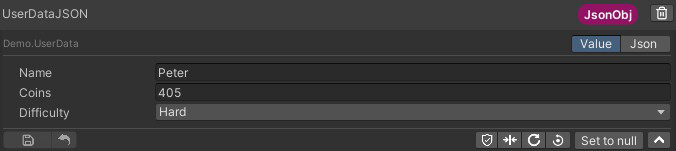
EazyPrefs comes with 3 pref type drawers. JSONObjPrefDrawer, EnumPrefDrawer and DefaultPrefDrawer.
#
⛓️ How They Work Together
Each pref shown in the EazyPrefs Editor is drawn using:
- A Pref Type Drawer — determines the full layout of the pref
- A Value Drawer — plugged into the type drawer to render the value itself
This layered architecture keeps things modular, allowing you to swap in custom visuals without rewriting everything.
#
⚙️ Example
Let’s say you have a JSONObjPref<Vector3>.
Here’s what happens behind the scenes:
- The type drawer
JSONObjPrefDrawer<Vector3>is used, because it's registered forJSONObjPref<T> - That type drawer internally uses the value drawer for
Vector3to draw the actual data - The drawer can also render buttons for viewing JSON, formatting, or debugging info
Similarly, for EnumPref<Difficulty>:
- EazyPrefs uses
EnumPrefDrawer<Difficulty>as the type drawer - And an appropriate value drawer to render a dropdown of enum values
If no type drawer is defined, the generic DefaultPrefDrawer<TPref, TValue> is used — it simply delegates everything to the value drawer.
#
🛠️ Why This Matters
- You can customize how your own pref types are drawn, e.g.,
MyStatsPref,PlayerSettingsPref - You can plug in new visuals for types that need special handling
- You get fine-grained control over editor UX for your team and tools